Total Visits : 9629
REGISTRATION GUIDELINE
Register now to join ICoSEM 2025, happening on 26–27 November 2025 at Armada Hotel, Petaling Jaya, Malaysia.
To register for the conference, please follow the steps below carefully:
🔗 Step 1: Visit the Official Event Page
Click the link below to access the ICoSEM 2025 event page:
👉 https://umevent.um.edu.my/ICOSEM2025
👤 Step 2: Create a UM Event Account
If you are a first-time user, you need to create an account on the UM Event system.
-
Click the “Login / Register” button at the top-right corner of the page.
-
Select “External Participant” if you are not affiliated with Universiti Malaya.
-
Fill in the registration form with your personal details and a valid email address.
-
You will receive a confirmation email—click the activation link to complete your account setup.
✅ Already have an account? Just log in with your email and password.
🖥 Step 3: Register for ICoSEM 2025
Once logged in:
-
Go back to the ICoSEM 2025 Event Page.
-
Click the “Register Now” button.
-
Fill in the registration form (personal info, presentation details if applicable, and category).
-
Choose your registration category (e.g., Presenter, Student, Listener, etc.).
-
Confirm the registration fee (as listed on the website).
-
Upload required documents (e.g., payment proof or student ID if needed).
-
Click “Submit” to finalize your registration.
💳 Step 4: Payment and Confirmation
-
Details for payment instructions are available under the "Registration Fee" section on the event page.
-
After payment, upload your proof of payment via the registration system or email it to the Secretariat (icosem@um.edu.my).
You will receive a confirmation email once your registration and payment have been verified.
REGISTRATION FEES
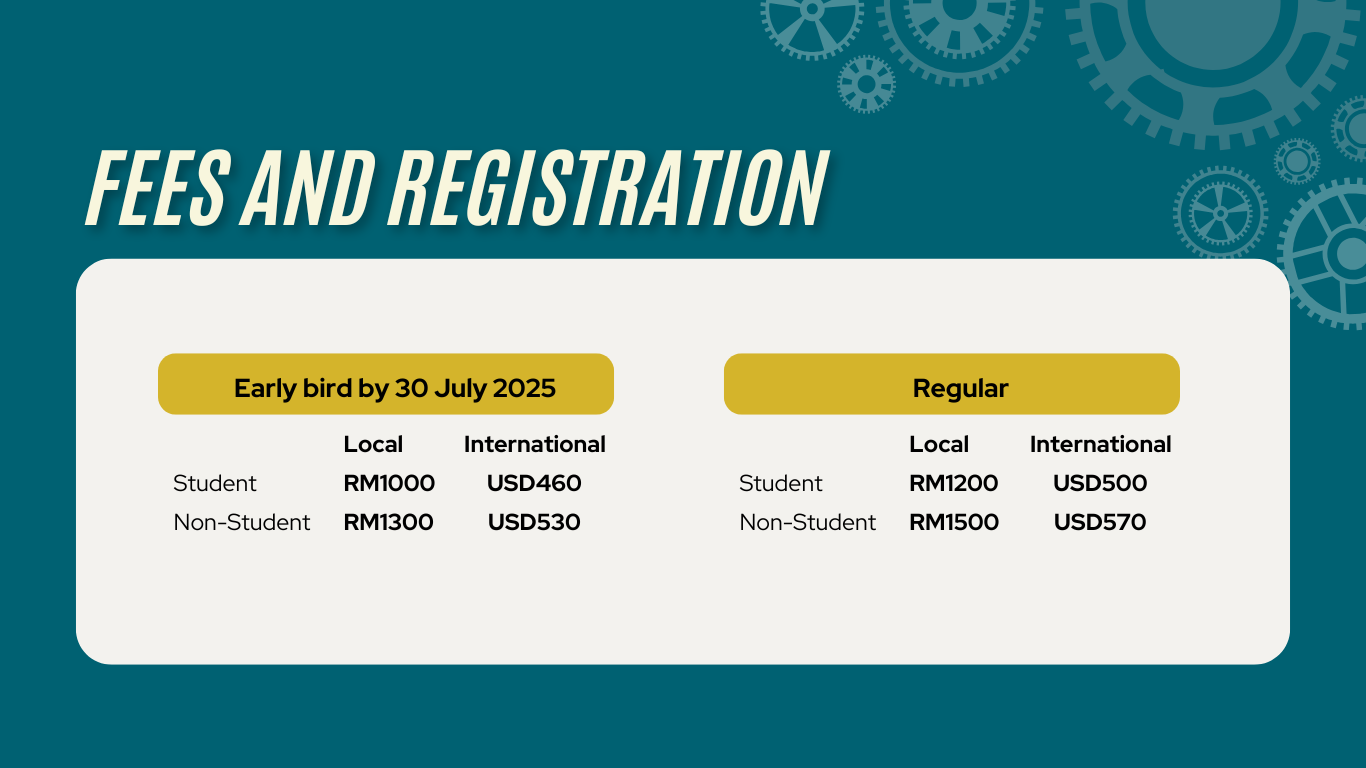
Registration Fee includes:-
- Attendance at all conference sessions & exhibition.
- Morning and afternoon refershment breaks and lunches.
Registration Policies:-
- Your registration will be valid when full payment had been received by the organizer.
- The organizer reserves the rights to amend any part of the program without giving prior notice should the need arise.
- The conference registration fee DOES NOT COVER transportation or accomodation.
- The organizer reserves the rights to cancel the conference or any part there of without the prior notice in the event of act of God, fire, act of government, terrorism, war or any other event beyond the control of organizer.
Cancellation Policy:-
- No cancellation is allowed.
- No refund will be made after registration.
📩 Need Help?
If you face any issues during registration or account setup, please contact:
ICoSEM 2025 Secretariat
📧 Email: icosem@um.edu.my
🌐 Website: https://umevent.um.edu.my/ICOSEM2025