Total Visits : 2428
HOW TO REGISTER?
Step 1: To register a new account, go to https://umevent.um.edu.my/register/
Step 2: Go to your registered email and activate the new account (Note: You will receive the activation email within 24 hours)
Step 3: Go to https://umevent.um.edu.my/IDC2026
Step 4: On the left side of the IDC2026 webpage, click on the Login button. Enter your registered ID and password and Sign In
Step 5: Select registration as Participant / Presenter and click Submit
Step 6: You are now registered!
ABSTRACT SUBMISSION
Step 1: Login to your UMEvent account at https://umevent.um.edu.my/login/
Step 2: Click 'My Conference > Abstract is Empty'
Step 3: Complete the information required at the 'Abstract Submission Form' and attach your abstract according to the template given (Abstract Submission)
Step 4: Submit the form.
Submit your abstract latest by 31 May 2026 via the UMEvent system and wait for our committee to respond. Thank you!
ACCEPTANCE NOTIFICATION
- You will be notified of your abstract acceptance via email by 15 June 2026.
- Upon receiving the acceptance notification, kindly proceed with the payment.
REGISTRATION FEE
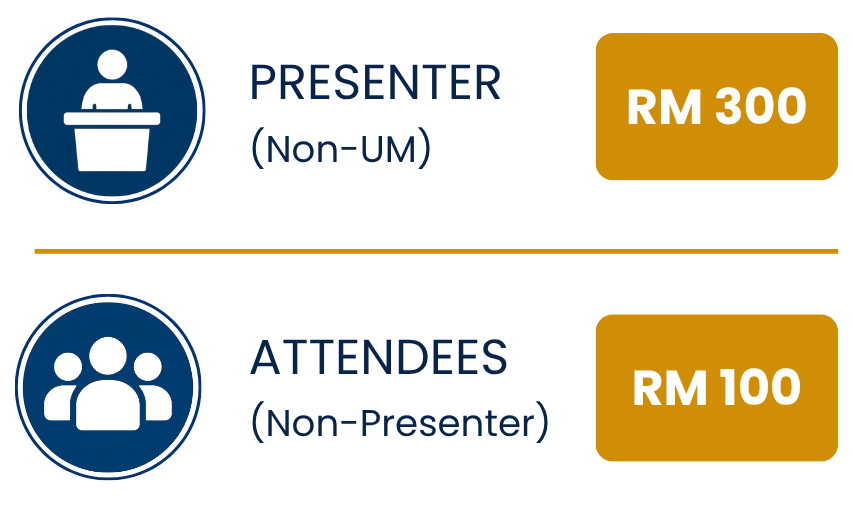
CONFIRMATION AND PAYMENT
1. After receiving the abstract acceptance notification, proceed to payment.
2. Follow the instructions given in the payment manual.
3. Please email a copy of the receipt to umbs@um.edu.my with the title '[Name] UMBSIDC2026'
4. Payment is non-refundable
*Please make your payment by 31 July 2026.