HOW TO REGISTER
ROLE TERMS
There is a total of 6 different roles to be registered in ISSCO 2025, including:
a. Individual Paper Presenter / First Author who would like to present an individual paper; (currently closed)
b. Panel Leader who would like to form a panel discussion with certain topics (migration, etc.); (currently closed)
c. Panel Members who would like to present a paper in certain panel discussion; (currently closed)
d. Co-Authors who would like to join the conference; (currently closed)
e. Participants who would like to join the conference. (currently closed)
f. Local Observers who would like to join the conference. (Sames steps as e. Participants, no need to fill in confirmation form) (currently closed - Walk-in Only)
REGISTRATION AND SUBMISSION PROCEDURE
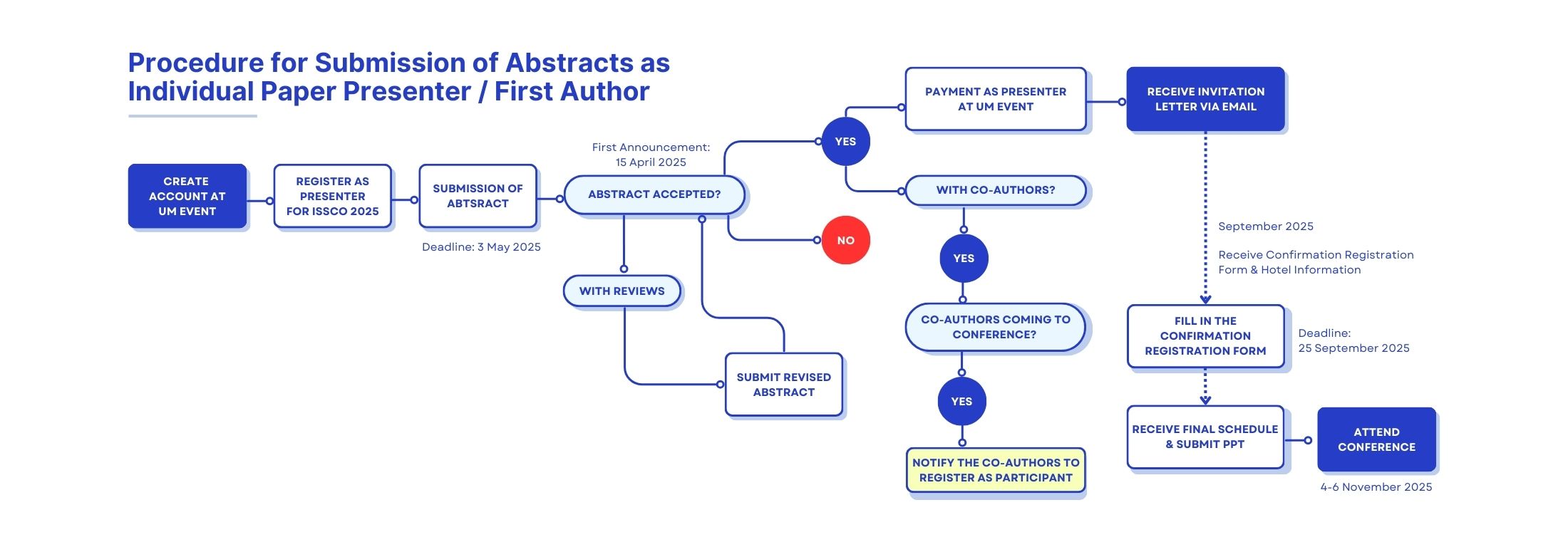
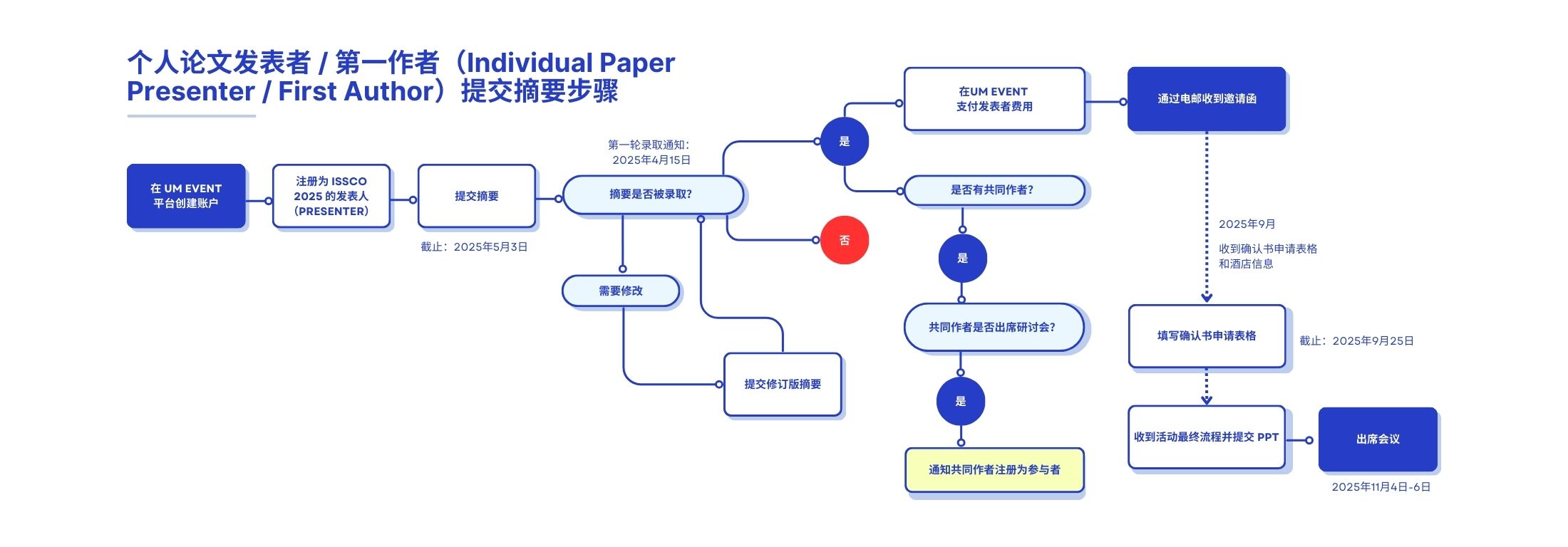
Part A: Submission of Abstracts as Individual Paper Presenter / First Author
Step 1: Create Account at UM Event
- Go to https://umevent.um.edu.my/.
- Click ‘User Registration’ tab to register your account and fill in your correct personal information.
or
- Scan the QR Code on the poster or go to https://umevent.um.edu.my/12THISSCO
- Click 'login' tab to and click 'register a new account' to register your account and fill in your correct personal information.
Step 2: Register as Presenter for ISSCO 2025
- Log in to your account.
- Select ISSCO 2025 on the page or go to Event List and search ISSCO 2025 by title and click ‘Register’.
- Fill in the registration form:
- Fill in your affiliation, title of paper, conference language and co-authors (name with affiliation) (if applicable).
- Select 'Individual Paper Presenter / First Author' for 'Role'.
- Select 'As a' 'Presenter'.
- Click ‘Submit’.
- Congratulations! You are now registered.
Step 3: Submission of Abstract
- Click Conference Name and column of Abstract Status.
- Fill in the appropriate details for abstract paper title, abstract (text), keywords.
- Select 'Oral' for Presentation Type.
- Upload your abstract which should include: (In word version using the abstract template provided) (Please click here for video tutorial to upload the abstract)
- Paper title
- Personal information of authors (Name with Affiliation)
- Abstract text not exceed 350 words and keywords
- The abstract review results will be notified through email.
- Submit the revised abstract if revisions are required.
Step 4: Payment of Presenter Fee
- Pay the presenter fee at the tab of payment (under registration) after the abstract is accepted.
*Please refer Payment Guidelines for more information.
*Open for Payment: 4 March 2025- Congratulations! You will receive an invitation letter through email.
Step 5: Confirm Registration
- Fill in the Confirmation Registration form before 25 September 2025.
*If this paper involved co-authors and the co-authors wish to attend the conference, please notify your co-authors to register as participants (Refer Part D for registration procedure).
*Any queries can be directed at issco@um.edu.my
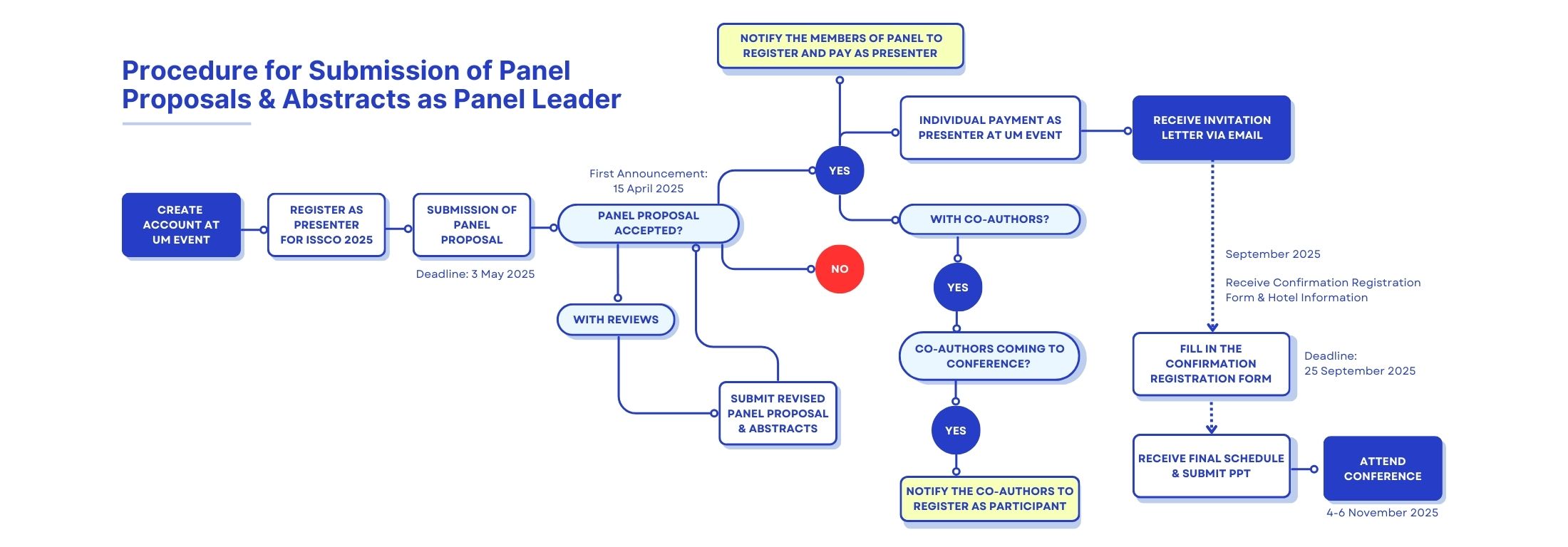
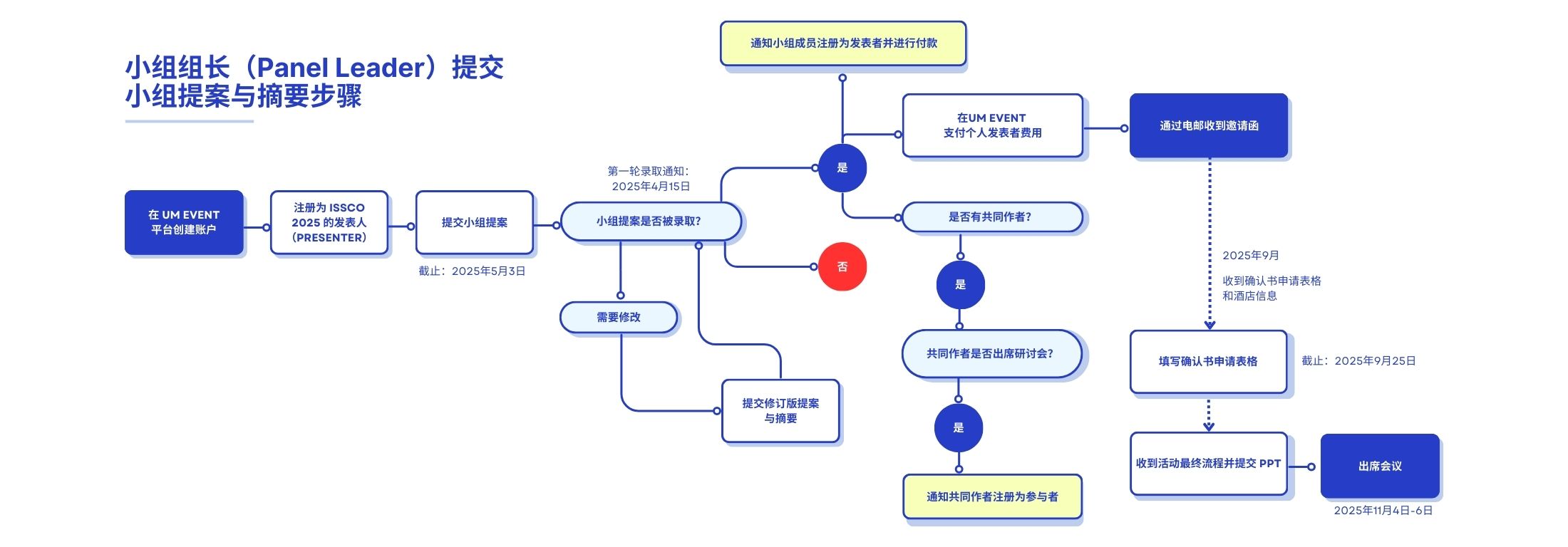
Part B: Submission of Panel Proposals & Abstracts as Panel Leader
Step 1: Create Account at UM Event
- Go to https://umevent.um.edu.my/.
- Click ‘User Registration’ tab to register your account and fill in your correct personal information.
or
- Scan the QR Code on the poster or go to https://umevent.um.edu.my/12THISSCO
- Click 'login' tab to and click 'register a new account' to register your account and fill in your correct personal information.
Step 2: Register as Presenter for ISSCO 2025
- Log in to your account.
- Select ISSCO 2025 on the page or go to Event List and search ISSCO 2025 by title and click ‘Register’.
- Fill in the registration form:
- Fill in your affiliation, title of paper, panel title, number of presenters / papers in the panel, conference language and co-authors (name with affiliation) (if applicable).
- Select 'Panel Leader' for 'Role'.
- Select 'As a' 'Presenter'.
- Click ‘Submit’.
- Congratulations! You are now registered.
Step 3: Submission of Panel Proposal
- Click Conference Name and column of Abstract Status.
- Fill in the details as follows:
- Panel Title at abstract paper title
- Main Abstract of Panel at abstract (text)
- Keywords of Panel at keywords
- Select 'Oral' for Presentation Type.
- Upload your panel proposal which should include: (In word version using the panel proposal template provided) (Please click here for video tutorial to upload the abstract)
- The panel title
- A main abstract and keywords of panel
- The list of paper presenters (names, emails and affiliations)
- The title, abstract, and keywords for each paper presenters
- The panel proposal review results will be notified through email.
- Submit the revised panel proposal together with revised abstracts of each paper presenters if revisions are required.
Step 4: Payment of Presenter Fee
- Pay your individual presenter fee at the tab of payment (under registration) after the abstract is accepted. Notify the panel members to register and pay as presenter at UM Event.
*Please refer Payment Guidelines for more information.
*Open for Payment: 4 March 2025- Congratulations! You will receive an invitation letter through email.
Step 5: Confirm Registration
- Fill in the Confirmation Registration form before 25 September 2025.
*For the panel members, refer Part C for submission and registration procedure.
*If your paper involved co-authors and the co-authors wish to attend the conference, please notify your co-authors to register as participants (Refer Part D for registration procedure).
*Any queries can be directed at issco@um.edu.my
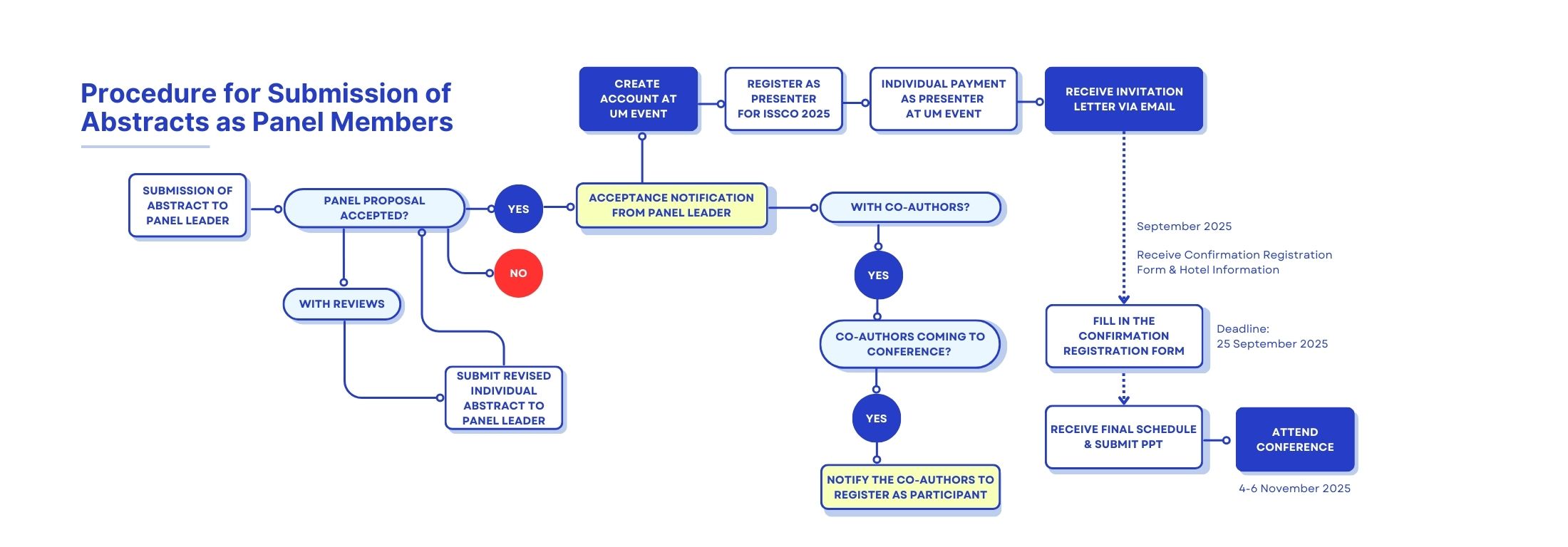
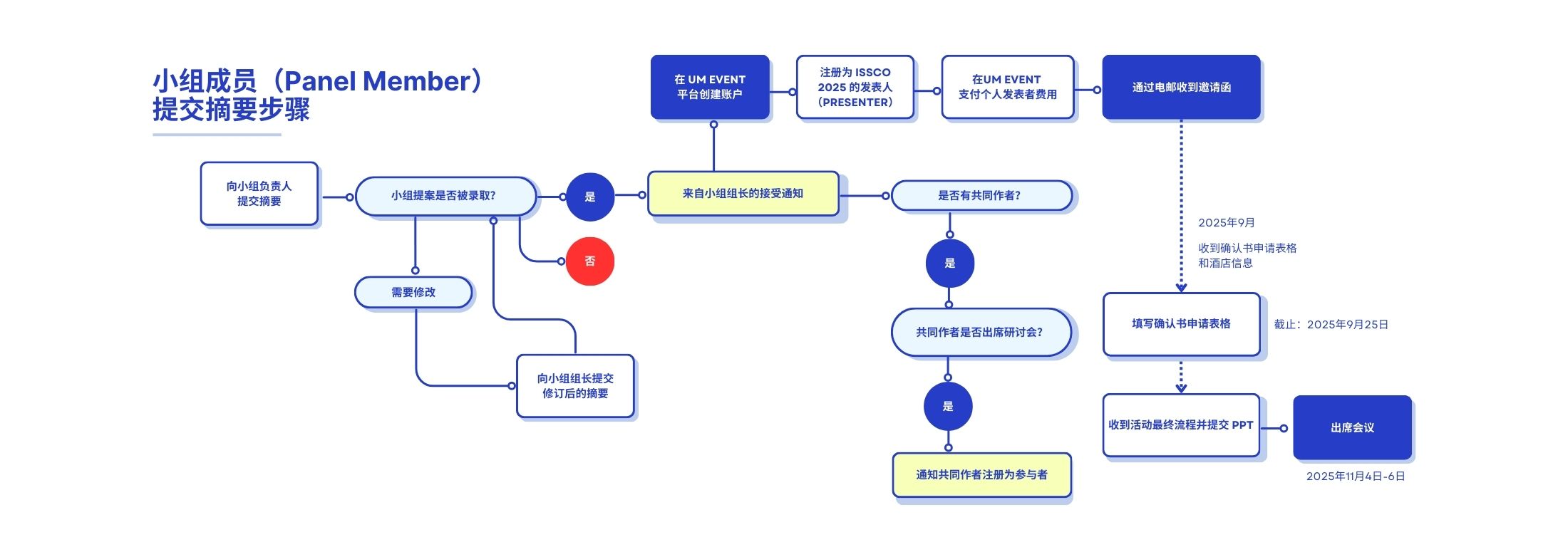
Part C: Submission of Abstracts as Panel Member
Step 1: Submission of Abstract to Panel Leader
- Please submit your abstract to the panel leader.
- Your abstract should include
- Paper title
- Personal Information of authors (Name, email, and affiliation)
- Abstract text not exceeding 350 words and keywords
- If revisions are required, please submit your revised abstract to panel leader.
Step 2: Create Account at UM Event
- After receive the acceptance notification from panel leader, register an account at UM Event.
- Go to https://umevent.um.edu.my/.
- Click ‘User Registration’ tab to register your account and fill in your correct personal information.
or
- After receive the acceptance notification from panel leader, register an account at UM Event.
- Scan the QR Code on the poster or go to https://umevent.um.edu.my/12THISSCO
- Click 'login' tab to and click 'register a new account' to register your account and fill in your correct personal information.
Step 3: Register as Presenter for ISSCO 2025
- Log in to your account.
- Select ISSCO 2025 on the page or go to Event List and search ISSCO 2025 by title and click ‘Register’.
- Fill in the registration form:
- Fill in your affiliation, title of paper, panel title, number of presenters / papers in the panel, conference language, and co-authors (name with affiliation) (if applicable).
- Select 'Panel Member' for 'Role'.
- Select 'As a' 'Presenter'.
- Click ‘Submit’.
- Congratulations! You are now registered.
Step 4: Payment of Presenter Fee
- Pay your individual presenter fee at the tab of payment (under registration).
*Please refer Payment Guidelines for more information.
*Open for Payment: 4 March 2025- Congratulations! You will receive an invitation letter through email.
Step 5: Confirm Registration & PPT Submission
- Fill in the Confirmation Registration form before 25 September 2025.
*If your paper involved co-authors and the co-authors wish to attend the conference, please notify your co-authors to register as participants (Refer Part D for registration procedure).
*Any queries can be directed at issco@um.edu.my
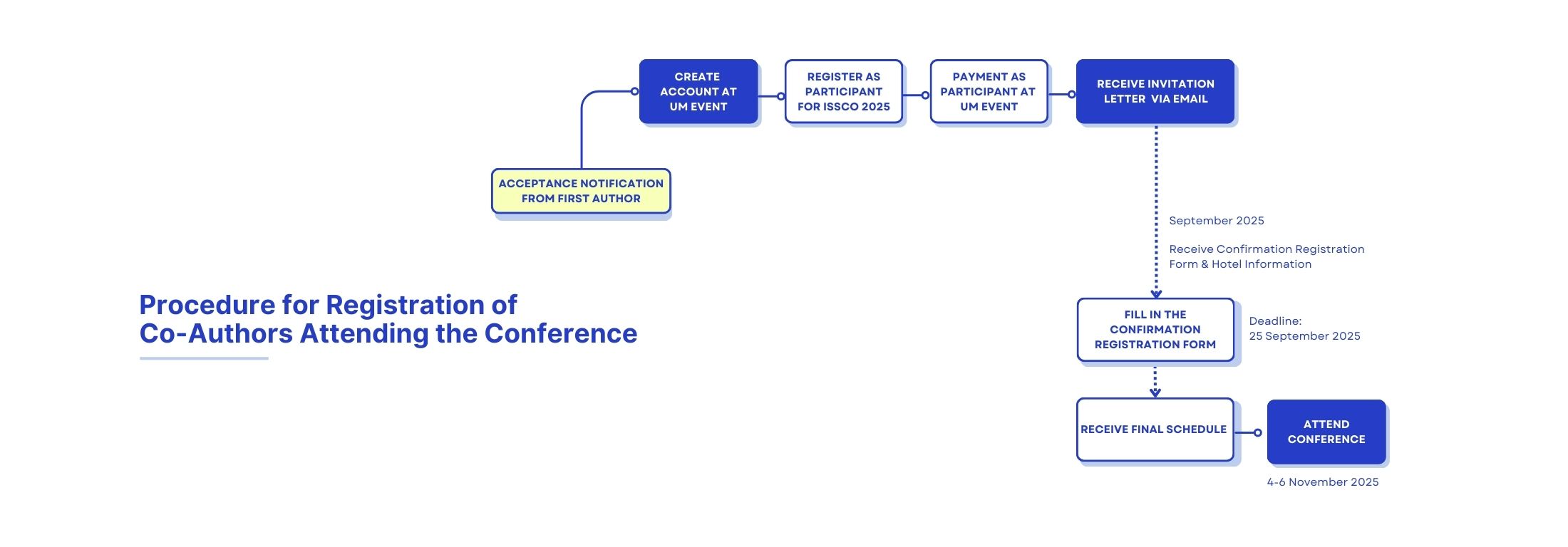
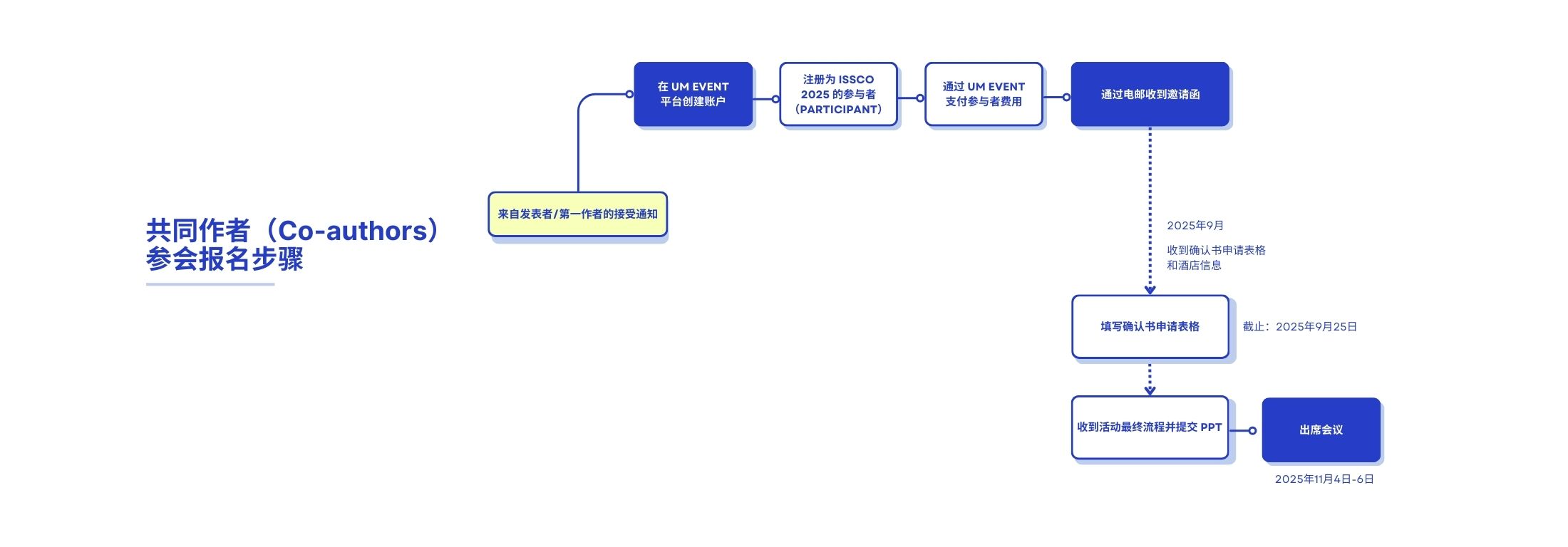
Part D: Registration of Co-authors Attending the Conference
Step 1: Create Account at UM Event
- After receive the acceptance notification from first author, register an account at UM Event.
- Go to https://umevent.um.edu.my/.
- Click ‘User Registration’ tab to register your account and fill in your correct personal information.
or
- After receive the acceptance notification from first author, register an account at UM Event.
- Scan the QR Code on the poster or go to https://umevent.um.edu.my/12THISSCO
- Click 'login' tab to and click 'register a new account' to register your account and fill in your correct personal information.
Step 2: Register as Participant for ISSCO 2025
- Log in to your account.
- Select ISSCO 2025 on the page or go to Event List and search ISSCO 2025 by title and click ‘Register’.
- Fill in the registration form:
- Fill in your affiliation, title of paper, panel title (if applicable) and co-authors (name with affiliation).
- Select 'Co-author' for 'Role'.
- Select 'As a' 'Participant'.
- Click ‘Submit’.
- Congratulations! You are now registered.
Step 3: Payment of Participant Fee
- Pay your participant fee at the tab of payment (under registration).
*Please refer Payment Guidelines for more information.
*Open for Payment: 4 March 2025- Congratulations! You will receive an invitation letter through email.
Step 4: Confirm Registration
- Fill in the Confirmation Registration form before 25 September 2025.
*Any queries can be directed at issco@um.edu.my
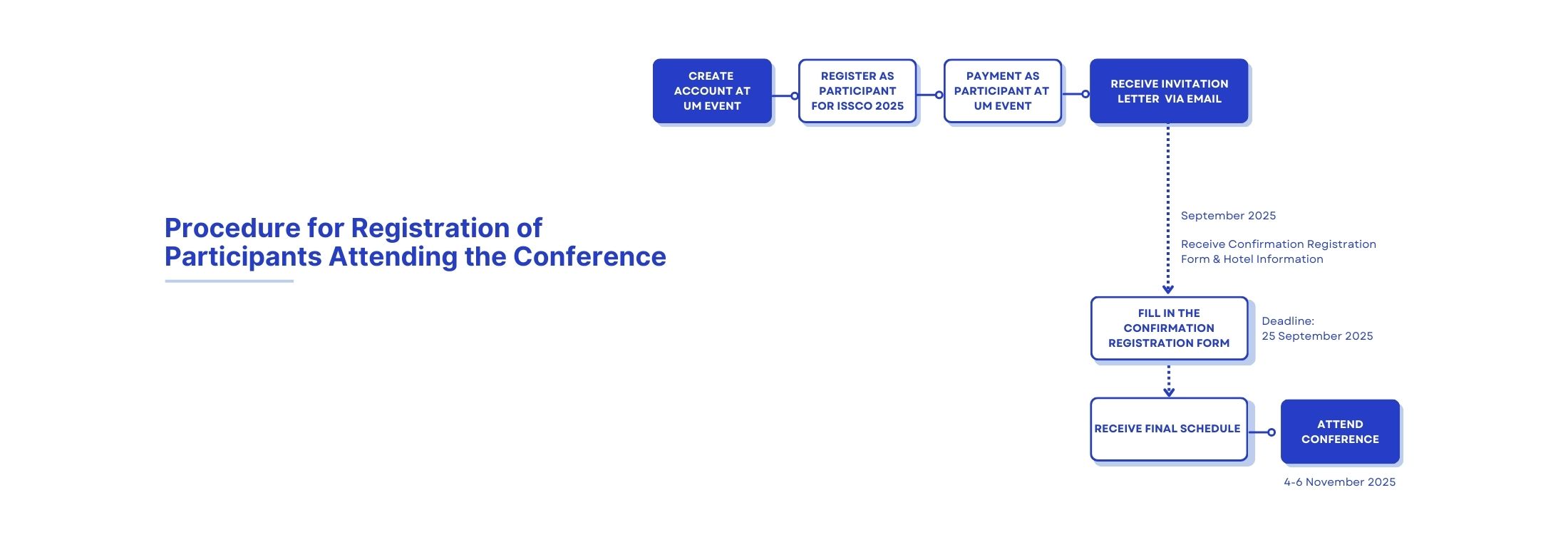
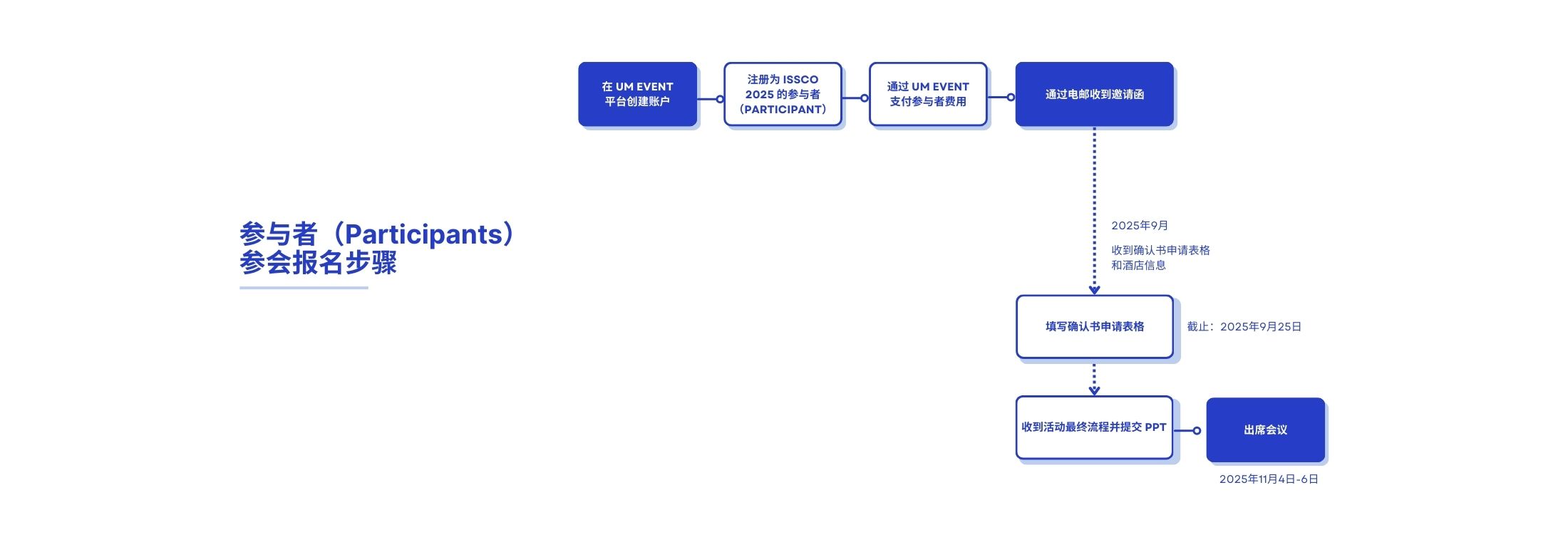
Part E: Registration of Participants Attending the Conference
Step 1: Create Account at UM Event
- Go to https://umevent.um.edu.my/.
- Click ‘User Registration’ tab to register your account and fill in your correct personal information.
or
- Scan the QR Code on the poster or go to https://umevent.um.edu.my/12THISSCO
- Click 'login' tab to and click 'register a new account' to register your account and fill in your correct personal information.
Step 2: Register as Participant for ISSCO 2025
- Log in to your account.
- Select ISSCO 2025 on the page or go to Event List and search ISSCO 2025 by title and click ‘Register’.
- Fill in the registration form:
- Fill in your affiliation.
- Select 'Participant' for 'Role'.
- Select 'As a' 'Participant'.
- Click ‘Submit’.
- Congratulations! You are now registered.
Step 3: Payment of Participant Fee
- Pay your participant fee at the tab of payment (under registration).
*Please refer Payment Guidelines for more information.
*Open for Payment: 4 March 2025- Congratulations! You will receive an invitation letter through email.
Step 4: Confirm Registration
- Fill in the Confirmation Registration form before 25 September 2025.
*Any queries can be directed at issco@um.edu.my
报名方式
'Role' 说明与报名提交步骤
在2025年 ISSCO 会议中,共设有5种报名角色,包括:
a. 个人论文发表者 / 第一作者(Individual Paper Presenter / First Author):希望报告个人论文的参会者;
b. 小组组长(Panel Leader):希望就特定主题(如移民等)组织小组讨论的组长;
c. 小组成员(Panel Members):希望在特定专题讨论中提交并报告论文的成员;
d. 共同作者(Co-Authors):希望参与会议的论文共同作者;
e. 参与者(Participants):希望参加会议的参会人员。