Total Visits : 5190
(I) Create Platform (UMEvent) Account
-
Register for the UMEvent platform at https://umevent.um.edu.my/register/
-
Click on the Account Verification link in your email, and login.
-
Select "International Conference on Mechanical Engineering Advances (MEKANIKUM 2026)" in the Upcoming Conferences.
-
Fill up your personal information.
-
Select the sub-conference :
-
ICSAM 2026 - International Conference on Smart and Advanced Manufacturing
-
NEXMAT 2026 - International Conference on Next Generation Materials
-
SSIEC 2026 - Smart and Sustainable Industrial Ecosystem Conference
-
-
Select the preferred mode of payment.
-
For the Role field, please choose either “PRESENTER” OR "PARTICIPANT".
(II) Abstract and Full paper Submission (Please skip this step if you are a non-presenter participant)
-
Login to your UMEvent account at: https://umevent.um.edu.my/login/
-
Click “Abstract is Empty” in the MEKANIKUM 2026 landing page in UMEvent.
-
Complete the Abstract/Fullpaper Submission Form
-
Complete the required nformation required at the “Abstract Submission Form” and attach your abstract as an MS Word file (*.Docx)
-
Submit the form.
-
Full papers can be uploaded using the same page.
(III) Confirmation and Payment
-
After receiving the abstract acceptance notification, proceed to payment in the MEKANIKUM 2026 landing page in UMEvent.
-
Follow the instructions given at the payment page.
-
Please email a copy of the receipt to mekanikum@um.edu.my with the title “[Presenter’s Name] Receipt”.
-
Please consult the Secretariat at mekanikum@um.edu.my if you wish to pay by Local Order (LO) / Purchase Order.
-
The payment status will be confirmed once the Secretariat has verified the receipt of your payment.
(V) Conference Fee Structure
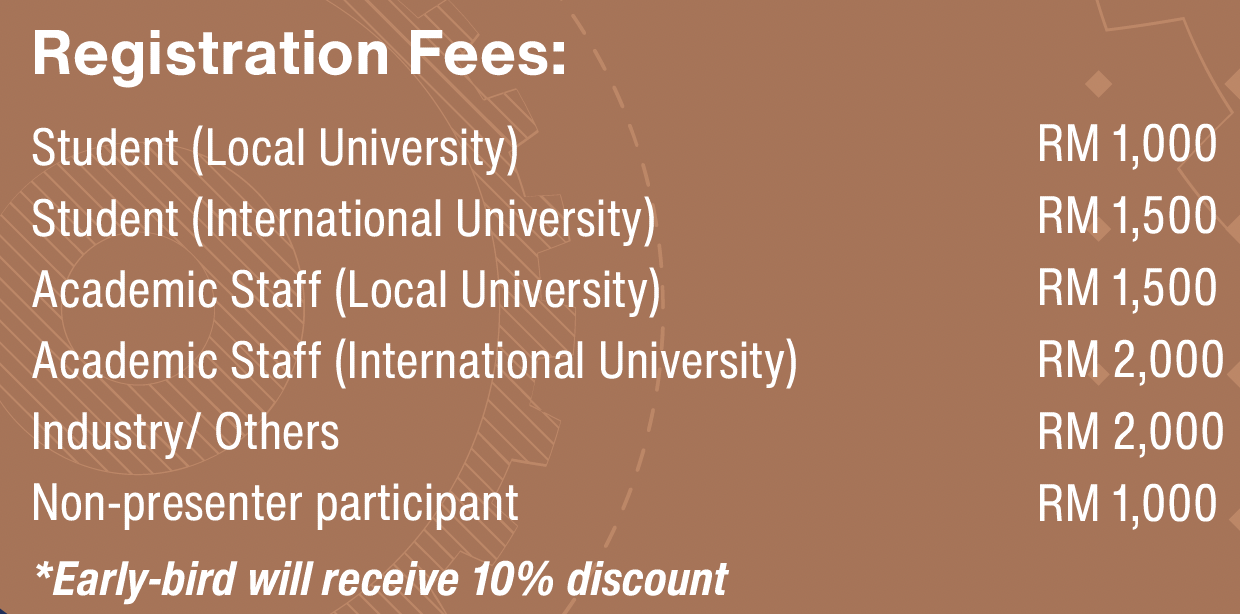
Note;
- Participation in the conference can be Presenter OR Participant.
- Presenter- take part to present an oral presentation
- Participant- Normal attendee
- Attendees are responsible for own accommodation arrangements.
- Fees will cover :
- Access to all symposium/ presentation sessions
- Conference kit/ goodies bag
- Welcoming break, Lunches and Breaks
- E- certificate
- Softcopy of MEKANIKUM program book